Boas Festas
What’s new in Excel 2016 – Office Blogs

Today we unbox Excel 2016’s new and improved business
analytics features, so you can take full advantage of each
capability as it applies to your unique business needs.
Excel 2016 improvements have been designed with the
analyst’s journey in mind, from gathering to consuming data.
Source: What’s new for business analytics in Excel 2016 – Office Blogs
Office 2016, mais possibilidades em Pivot Tables
Ms VBA no AMA de reddit… A ler!
How to create relational databases in Excel 2013
Not anymore: Excel 2013’s table tools include features that make it easy to link charts and cells, perform searches, and create dynamically updated reports, just like—yes—a relational database. Excel can handle a lot of day-to-day office data this way, and we’ll show you how to set it up.
How Excel makes a relational database
Relational databases—databases structured to recognize relations among the information stored in them—are essential for working with large amounts of business data. They let you quickly search and retrieve specific information, view the same data set in multiple ways, and reduce data errors and redundancy. Try doing that with a spreadsheet.
To show you how Excel makes it easier, we will create two tables: the master table and the detail table. The master table is the primary table, which generally contains unique records (such as name, address, city, state, etc.). This table rarely changes except to, say, add or delete individuals.
For every record in the master table, there can be many records in the detail tables (also called slave or child tables) that link back to the master table. This is called a one-to-many relationship. The data in the detail tables—such as daily sales, product prices, quantities—usually changes constantly.
To avoid repeating all the master information in every detail table, you create relationships using one unique field, such as the Sales ID, then let Excel do the rest. For example, you have 10 sales people who all have unique, demographic information (master table). Each sales person has 200 products that he/she sells (detail or child table). At the end of each year, you need a report that provides the total yearly sales by person, but you also need a report that provides the total sales by city.
For this tutorial, we’ll create a master table with the salespersons’ information and a second table that provides their total sales, by quarter, for the year. The Sales ID is the relational field that connects the tables. Then, we’ll create a report (or pivot table) that shows which cities had the highest sales.
Open Excel and select a new, blank worksheet.
Microsoft vai lançar uma segunda versão do Office para Windows
Esperemos que as funções de programação e compatibilidade total de mantenham.
Para ler o artigo PFF siga o link
http://pplware.sapo.pt/informacao/microsoft-vai-lancar-uma-segunda-versao-do-office-para-windows/

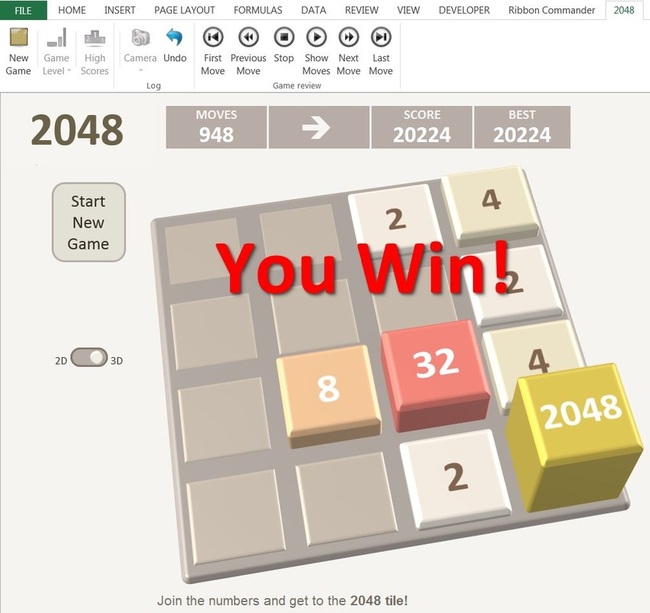
2048… no Excel!
Já seria de esperar, mas de qualquer forma parabéns ao programador (http://www.spreadsheet1.com)!
O Futuro das Excel WebApps…
A empresa, infelizmente, não deu prazos concretos para a implementação das mesmas, mas a sua menção indica que já estão a ser desenvolvidas.
A lista é a seguinte (em inglês; original retirado da MS):
– Adding and Editing Freeze Panes (they are already viewable)
– Adding and Editing Comments (they are already viewable)
– Android Tablet Support
– Editing Files with VBA
– Chart Editing
– Viewing, Moving, and Resizing Shapes
– Loading XLS files in O365 (already works in SkyDrive)
– Print to PDF
– WEBSERVICE Functions
– Common Keyboard Shortcuts
– Custom Sort a Range (sort on multiple columns)
– Insert an Image
– Hide/Unhide Rows & Columns
– Reorder Sheets
– Show Aggregates for the Selected Range in the Statusbar
– Rename a Spreadsheet from within Web Excel
– Drag and Drop Cells in a Sheet
– Protect Sheets from Being Edited by Others
– Insert and Modify Apps for Office
Microsoft ressalva que a lista acima não está em nenhuma ordem específica. Estes são os itens que têm a maior prioridade.
De salientar que na lista esta um item de extrema importância para quem utiliza o Excel a um nível de desenvolvimento e integração com outras aplicações; a inclusão de programação em VBA.

Novas potencialidades na Excel Web App…
“About a month ago, we announced that Excel Web App and the Office Web Apps are destined to become a comprehensive productivity experience on more browsers and devices (not just companions to the desktop applications). We didn’t give any specific timelines as part of that, but last week we released our first feature update since that announcement. I’m excited to share some of the awesome new things you can do in Excel Web App now in both SkyDrive and Office365, and I’ll give a peek at some of what we’ve got coming in future updates!”
<Leia mais>

Excel Web app
Tablet da Microsoft… finalmente!
Pelos dados que foram aposentados o tablet terá duas versões, RT e Pro.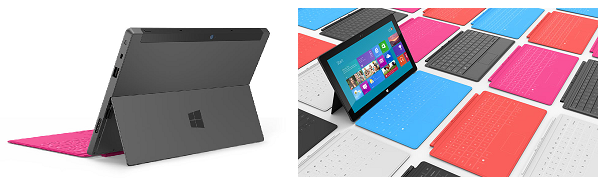
A versão RT é um tablet com todas as limitações que um tablet tem face a um PC normal. Já a versão Pro parece poder utilizar o software de PC sendo esta uma enorme vantagem no mercado empresarial (MS-office, macros/VBA, apresentações Powerpoint nativas, etc…).
Por último, resta saber o preço das duas versões…
Para ler mais pff siga o LINK
Microsoft Office para IOS
Este desenvolvimento de Office para plataformas moveis (para alem da cloud), parece-nos um passo essencial para a continuação do domínio deste pacote de produtividade sendo também uma excelente noticia para todos nós (utilizadores), permitindo a utilização dos nossos documentos na plataforma IOS sobre software feito pela própria Microsoft.
Para ler mais siga o LINK


